RabbitMQ
RabbitMQ
Why use MQ
1. Traffic peak reduction
2. Application decoupling
3. Asynchronous processing , such as the asynchronous release confirmation mentioned later
Four core concepts:
producer, switch , queue, consumer
working principle
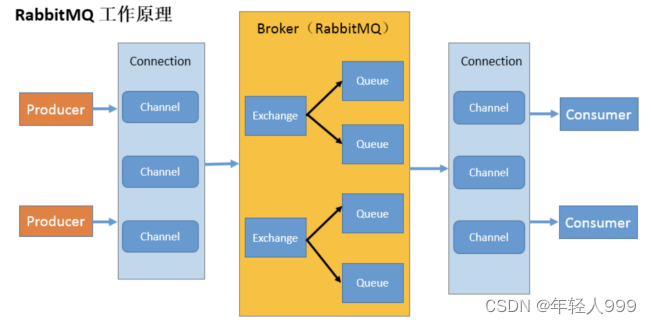
Broker : An application that receives and distributes messages. RabbitMQ Server is Message Broker.
Virtual host : Designed for multi-tenancy and security reasons, the basic components of AMQP are divided into a virtual group, similar to the namespace concept in the network. When multiple different users use the services provided by the same RabbitMQ server, multiple vhosts can be divided, and each user creates exchange/queue and other
Connections in their own vhost: TCP connection
Channel between publisher/consumer and broker : If A Connection is established every time RabbitMQ is accessed. When the message volume is large, the overhead of establishing a TCP Connection will be huge and the efficiency will be low. Channel is a logical connection established inside the connection. If the application supports multi-threading, each thread usually creates a separate channel for communication. The AMQP method includes the channel id to help the client and message broker identify the channel, so the channels are completely isolated. of. Channel, as a lightweight Connection, greatly reduces the operating system's cost of establishing a TCP connection.
Exchange : the message reaches the first stop of the broker. According to the distribution rules, it matches the routing key in the query table and distributes the message to the queue. Commonly used types are: direct (point-to-point), topic (publish-subscribe) and fanout (multicast)
Queue : the message is finally sent here to wait for the consumer to take it away
Binding : the virtual connection between exchange and queue, in binding Can contain routing key, Binding information is saved to the query table in exchange, used for message distribution basis
The code is roughly as follows:
configuration class: define the switch and queue, and then bind the two.
Producer: encapsulate the class and send it to the switch. The switch sends the message to the specified queue according
to the routing key. Consumer: processes the message.
Six modes.
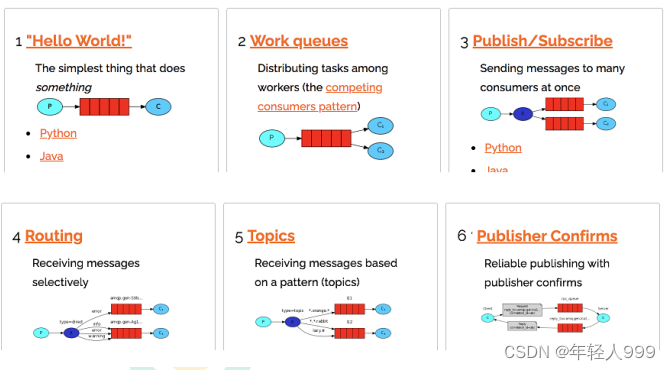
Code for the first mode:
public class Producer {
private final static String QUEUE_NAME = "hello";
public static void main(String[] args) throws Exception {
//创建一个连接工厂
ConnectionFactory factory = new ConnectionFactory();
factory.setHost("182.92.234.71");
factory.setUsername("admin");
factory.setPassword("123");
//channel 实现了自动 close 接口 自动关闭 不需要显示关闭
try(Connection connection = factory.newConnection();Channel channel = connection.createChannel()) {
/**
* 生成一个队列
* 1.队列名称。队列的名称于我们来说至关重要,我们需要指定我们的消费者去消费哪个队列的消息。
* 2.队列里面的消息是否持久化 默认消息存储在内存中
* 3.该队列是否只供一个消费者进行消费 是否进行共享 true 可以多个消费者消费
* 4.是否自动删除 最后一个消费者端开连接以后 该队列是否自动删除 true 自动删除
* 5.其他参数
*/
channel.queueDeclare(QUEUE_NAME,false,false,false,null);
String message="hello world";
/**
* 发送一个消息
* 1.发送到那个交换机
* 2.路由的 key 是哪个
* 3.其他的参数信息
* 4.发送消息的消息体
*/
channel.basicPublish("",QUEUE_NAME,null,message.getBytes());
System.out.println("消息发送完毕");
}
}
}

public class Consumer {
private final static String QUEUE_NAME = "hello";
public static void main(String[] args) throws Exception {
ConnectionFactory factory = new ConnectionFactory();
factory.setHost("182.92.234.71");
factory.setUsername("admin");
factory.setPassword("123");
Connection connection = factory.newConnection();
Channel channel = connection.createChannel();
System.out.println("等待接收消息....");
//推送的消息如何进行消费的接口回调
DeliverCallback deliverCallback=(consumerTag,delivery)->{
String message= new String(delivery.getBody());
System.out.println(message);
};
//取消消费的一个回调接口 如在消费的时候队列被删除掉了
CancelCallback cancelCallback=(consumerTag)->{ System.out.println("消息消费被中断"); };
/**
* 消费者消费消息
* 1.消费哪个队列
* 2.消费成功之后是否要自动应答 true 代表自动应答 false 手动应答
* 3.消费者未成功消费的回调
*/
channel.basicConsume(QUEUE_NAME,true,deliverCallback,cancelCallback);
}
}

Producer: Get channel, declare queue (queueDeclare), send message (basicPublish)
Consumer: Get channel, receive and reject callback interface, consume message (basicConsume)
Message response
Automatic response (default)
To ensure that messages are not lost during consumption, you need to change the automatic response to manual response.
Three ways to answer manually. The advantage of manual answering is that it can respond in batches and reduce network congestion.
    Channel.basicAck(用于肯定确认); // RabbitMQ 已知道该消息并且成功的处理消息,可以将其丢弃了
    Channel.basicNack(用于否定确认);
    Channel.basicReject(用于否定确认); // 与 Channel.basicNack 相比少一个参数,不处理该消息了直接拒绝,可以将其丢弃了
How to ensure that the messages sent by the message producer are not lost when the RabbitMQ service is stopped. By default when RabbitMQ exits or crashes for some reason, it ignores queues and messages unless it is told not to do so. Two things need to be done to ensure that messages are not lost: We need to mark both the queue and the message as persistent.
将消息标记为持久化并不能完全保证不会丢失消息。如果需要
更强有力的持久化策略,参考后边课件发布确认章节。
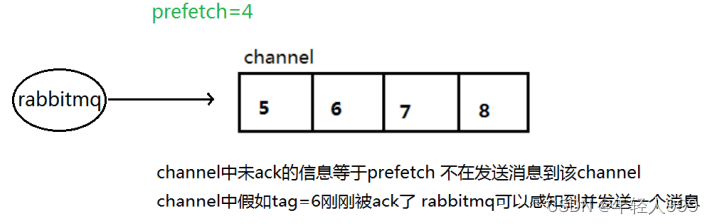
不公平分发:
    int prefetchCount = 1; // 预取值
    channel.basicQos(prefetchCount ); // 预取值为 1 是最保守的。当然这将使吞吐量变得很低,特别是消费者连接延迟很严重的情况下
发布确认
不要把消息应答和发布确认搞混了,
消息应答(手动)是,你的消息已经被消费了或拒绝了,一个明确的答复。
发布确认是,消息我发送到队列里了,消费与否是另外一回事。
一旦消息被投递到所有匹配的队列之后,broker 就会发送一个确认给生产者(包含消息的唯一 ID),这就使得生产者知道消息已经正确到达目的队列了,如果消息和队列是可持久化的,那么确认消息会在将消息写入磁盘之后发出。
单个发布确认,批量发布确认(只是和单个发布确认的逻辑不同而已)
channel.confirmSelect();
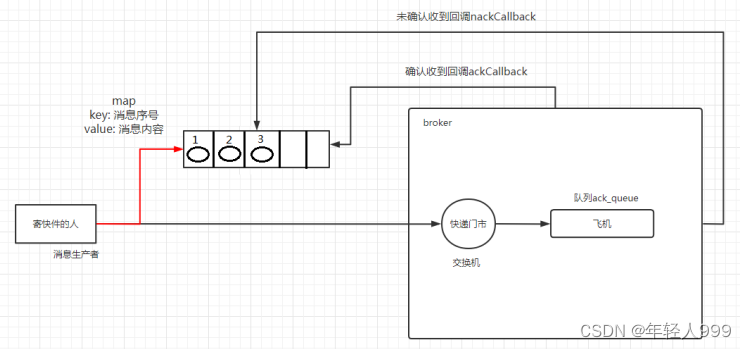
异步确认虽然编程逻辑比上两个要复杂,但是性价比最高,无论是可靠性还是效率都没得说,他是利用回调函数来达到消息可靠性传递的,这个中间件也是通过函数回调来保证是否投递成功.
public static void publishMessageAsync() throws Exception {
try (Channel channel = RabbitMqUtils.getChannel()) {
String queueName = UUID.randomUUID().toString();
channel.queueDeclare(queueName, false, false, false, null);
//开启发布确认
channel.confirmSelect();
/**
* 线程安全有序的一个哈希表,适用于高并发的情况
* 1.轻松的将序号与消息进行关联
* 2.轻松批量删除条目 只要给到序列号
* 3.支持并发访问
*/
ConcurrentSkipListMap<Long, String> outstandingConfirms = new ConcurrentSkipListMap<>();
/**
* 确认收到消息的一个回调
* 1.消息序列号
* 2.true 可以确认小于等于当前序列号的消息
* false 确认当前序列号消息
*/
ConfirmCallback ackCallback = (sequenceNumber, multiple) -> {
if (multiple) {
//返回的是小于等于当前序列号的未确认消息 是一个 map
ConcurrentNavigableMap<Long, String> confirmed = outstandingConfirms.headMap(sequenceNumber, true);
//清除该部分未确认消息
confirmed.clear();
}else{
//只清除当前序列号的消息
outstandingConfirms.remove(sequenceNumber);
}
};
ConfirmCallback nackCallback = (sequenceNumber, multiple) -> {
String message = outstandingConfirms.get(sequenceNumber);
System.out.println("发布的消息"+message+"未被确认,序列号"+sequenceNumber);
};
/**
* 添加一个异步确认的监听器
* 1.确认收到消息的回调
* 2.未收到消息的回调
*/
channel.addConfirmListener(ackCallback, null);
long begin = System.currentTimeMillis();
for (int i = 0; i < MESSAGE_COUNT; i++) {
String message = "消息" + i;
/**
* channel.getNextPublishSeqNo()获取下一个消息的序列号
* 通过序列号与消息体进行一个关联
* 全部都是未确认的消息体
*/
outstandingConfirms.put(channel.getNextPublishSeqNo(), message);
channel.basicPublish("", queueName, null, message.getBytes());
}
long end = System.currentTimeMillis();
System.out.println("发布" + MESSAGE_COUNT + "个异步确认消息,耗时" + (end - begin) + "ms");
}
}

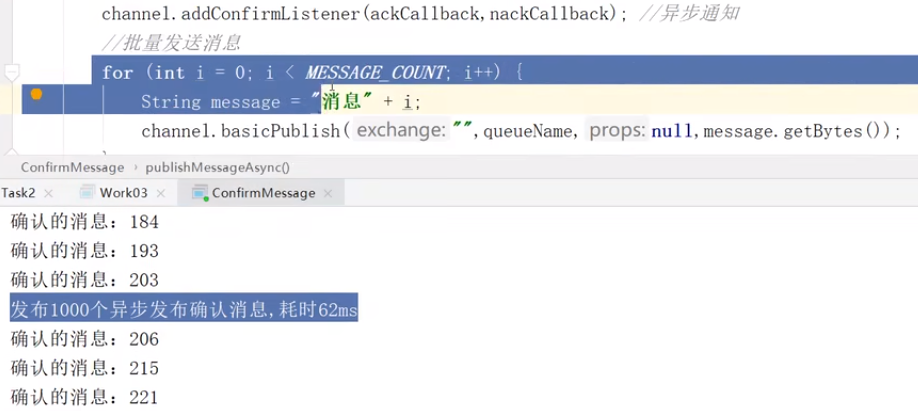
异步:输出“发布1000个异步发布确认消息,耗时62ms”的时候,已经发完了,但是确认并没有完成,二者互相不耽误。
如何处理异步未确认消息
最好的解决的解决方案就是把未确认的消息放到一个基于内存的能被发布线程访问的队列,比如说用 ConcurrentLinkedQueue 这个队列在 confirm callbacks(成功和失败) 与发布线程之间进行消息的传递。发消息的线程和监听器的线程。一个线程负责监听、一个线程负责发送并打印结果。两个线程如何交互:ConcurrentLinkedQueue 。老师这里实际用的是:ConcurrentSkipListMap 。
弹幕:如果你需要【按顺序存储】键值对并且希望能够高效地进行并发读写操作,SkipListMap 是一个不错的选择。只需线程安全的队列,【不关心元素的顺序】, LinkedQueue 更适合。
1、发消息的时候把发送的,放到ConcurrentSkipListMap里,outstandingConfirms.put(channel.getNextPublishSeqNo(), message);
2、在确认回调里,删除了已经确认的,剩下就是未确认的喽。
ConcurrentNavigableMap<Long, String> confirmed = outstandingConfirms.headMap(sequenceNumber, true);
弹幕: headMap方法返回的是一个视图,对视图的操作会影响原来的 map,所以清空headMap没有问题 、 (ConcurrentNavigableMap)这是一个支持高并发的map,headmap是生成一个映射并不是new了一个新的map
headMap方法,截取 ConcurrentSkipListMap 集合元素,将 sequenceNumber 之前的截取到 ConcurrentNavigableMap 里面。
3、未确认的回调里面处理,没有确认的消息
代码模式:
生产者:获取连接,发动到队列,只不过有两个异步确认的回调函数
消费者:
下面引入交换机,
fanout 代码就是在生产者和消费者之中,声明交换机并通过路由键绑定临时队列。
direct 代码就是在消费者之中,声明交换机并通过路由键绑定声明的队列;生产者中,声明交换机但是没有绑定。
topic 代码就是在消费者之中,声明交换机并通过路由键绑定声明的队列;生产者中,声明交换机但是没有绑定。
死信队列 代码就是在消费者之中,死信队列绑定死信交换机,正常队列绑定死信交换机,channel.queueDeclare(normalQueue, false, false, false, params);;生产者中,声明交换机但是没有绑定。
延时队列代码上大体是,
配置类:定义交换机和队列,然后二者进行绑定
生产者:封装好的类,发送到交换机,交换机跟据路由键发送到消息指定队列
消费者:对消息处理
如何处理异步未确认消息
最好的解决的解决方案就是把未确认的消息放到一个基于内存的能被发布线程访问的队列,比如说用 ConcurrentLinkedQueue 这个队列在 confirm callbacks 与发布线程之间进行消息的传递。
发布/订阅
RabbitMQ 消息传递模型的核心思想是: 生产者生产的消息从不会直接发送到队列。生产者只能将消息发送到交换机(exchange),交换机工作的内容非常简单,一方面它接收来自生产者的消息,另一方面将它们推入队列。
直接(direct),主题(topic),标题(headers) ,扇出(fanout)
fanout
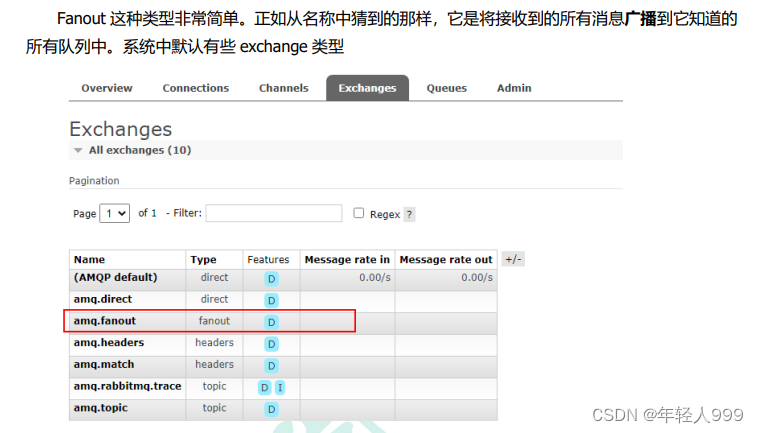
channel.exchangeDeclare(EXCHANGE_NAME, "fanout"); // 交换机在生产者中定义
direct
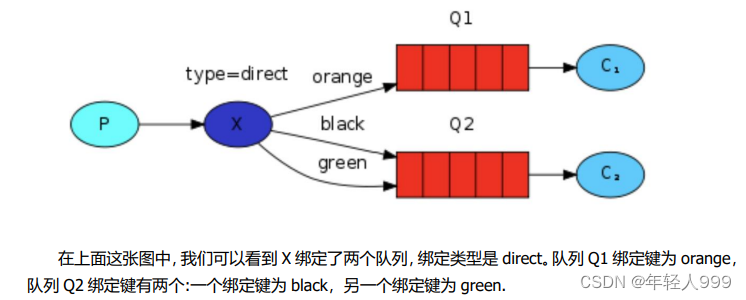
在这种绑定情况下,生产者发布消息到 exchange 上,绑定键为 orange 的消息会被发布到队列 Q1。绑定键为 black 和 green 的消息会被发布到队列 Q2,其他消息类型的消息将被丢弃。
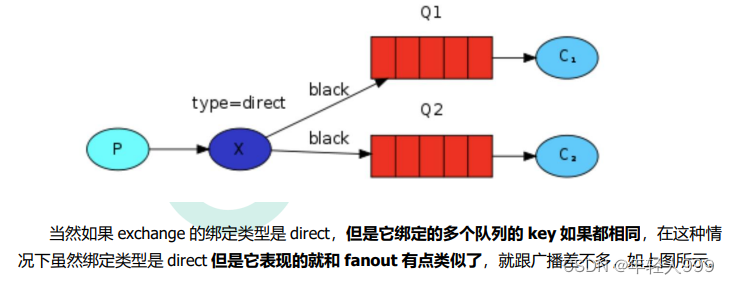
topic
尽管使用 direct 交换机改进了我们的系统,但是它仍然存在局限性-比方说我们想接收的日志类型有 info.base 和 info.advantage,某个队列只想 info.base 的消息,那这个时候 direct 就办不到了。这个时候就只能使用 topic 类型。发送到类型是 topic 交换机的消息的 routing_key 不能随意写,必须满足一定的要求,它必须是一个单词列表,以点号分隔开。这些单词可以是任意单词,比如说:“stock.usd.nyse”, “nyse.vmw”, “quick.orange.rabbit”,这种类型的。
在这个规则列表中,其中有两个替换符是大家需要注意的
*(星号)可以代替一个单词
#(井号)可以替代零个或多个单词
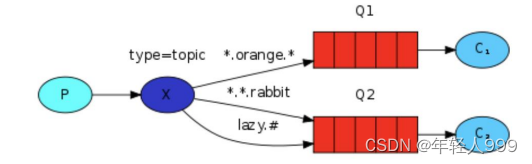
当一个队列绑定键是#,那么这个队列将接收所有数据,就有点像 fanout 了
如果队列绑定键当中没有#和*出现,那么该队列绑定类型就是 direct 了
死信队列
为了保证订单业务的消息数据不丢失,需要使用到 RabbitMQ 的死信队列机制,当消息消费发生异常时,将消息投入死信队列中.还有比如说:用户在商城下单成功并点击去支付后在指定时间未支付时自动失效。
1、消息 TTL 过期
2、队列达到最大长度(队列满了,无法再添加数据到 mq 中)
3、消息被拒绝(basic.reject 或 basic.nack)并且 requeue=false
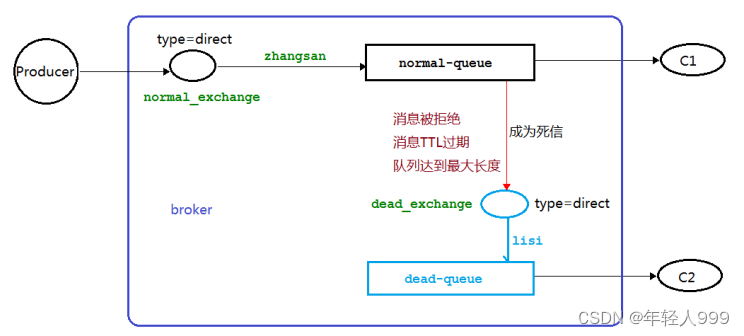
DLX:(dead-letter-exchange的缩写)死信队列交换机
DLK:(dead-letter-routing-key的缩写)死信队列routingKey
TTL:(time-to-live的缩写)存活时间
public class Producer {
private static final String NORMAL_EXCHANGE = "normal_exchange";
public static void main(String[] argv) throws Exception {
try (Channel channel = RabbitMqUtils.getChannel()) {
channel.exchangeDeclare(NORMAL_EXCHANGE, BuiltinExchangeType.DIRECT);
//设置消息的 TTL 时间
AMQP.BasicProperties properties = new AMQP.BasicProperties().builder().expiration("10000").build();
//该信息是用作演示队列个数限制
for (int i = 1; i <11 ; i++) {
String message="info"+i;
channel.basicPublish(NORMAL_EXCHANGE, "zhangsan", properties, message.getBytes());
System.out.println("生产者发送消息:"+message);
}
}
}
}

public class Consumer01 {
//普通交换机名称
private static final String NORMAL_EXCHANGE = "normal_exchange";
//死信交换机名称
private static final String DEAD_EXCHANGE = "dead_exchange";
public static void main(String[] argv) throws Exception {
Channel channel = RabbitUtils.getChannel();
//声明死信和普通交换机 类型为 direct
channel.exchangeDeclare(NORMAL_EXCHANGE, BuiltinExchangeType.DIRECT);
channel.exchangeDeclare(DEAD_EXCHANGE, BuiltinExchangeType.DIRECT);
//声明死信队列
String deadQueue = "dead-queue";
channel.queueDeclare(deadQueue, false, false, false, null);
//死信队列绑定死信交换机与 routingkey
channel.queueBind(deadQueue, DEAD_EXCHANGE, "lisi");
//正常队列绑定死信队列信息
Map<String, Object> params = new HashMap<>();
//正常队列设置死信交换机 参数 key 是固定值
params.put("x-dead-letter-exchange", DEAD_EXCHANGE);
//正常队列设置死信 routing-key 参数 key 是固定值
params.put("x-dead-letter-routing-key", "lisi");
String normalQueue = "normal-queue";
channel.queueDeclare(normalQueue, false, false, false, params);
channel.queueBind(normalQueue, NORMAL_EXCHANGE, "zhangsan");
System.out.println("等待接收消息.....");
DeliverCallback deliverCallback = (consumerTag, delivery) -> {
String message = new String(delivery.getBody(), "UTF-8");
System.out.println("Consumer01 接收到消息"+message);
};
channel.basicConsume(normalQueue, true, deliverCallback, consumerTag -> {});
}
}

延迟队列
延时队列,队列内部是有序的,最重要的特性就体现在它的延时属性上,延时队列中的元素是希望在指定时间到了以后或之前取出和处理。
1.订单在十分钟之内未支付则自动取消
2.新创建的店铺,如果在十天内都没有上传过商品,则自动发送消息提醒。
3.用户注册成功后,如果三天内没有登陆则进行短信提醒。
4.用户发起退款,如果三天内没有得到处理则通知相关运营人员。
5.预定会议后,需要在预定的时间点前十分钟通知各个与会人员参加会议。
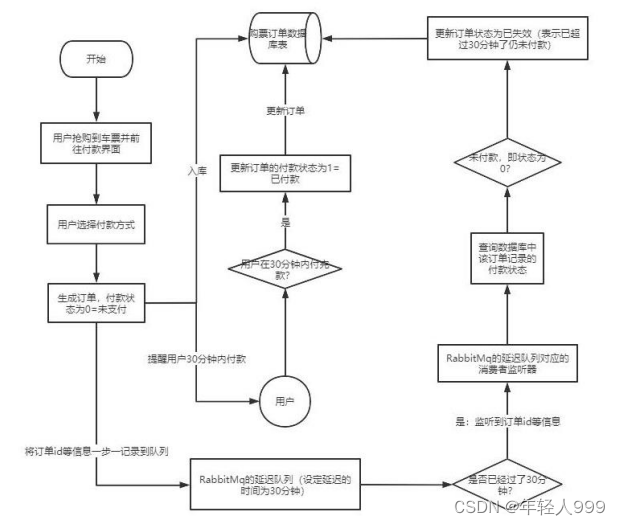
消息设置 TTL 、队列设置 TTL 。
如果一条消息设置了 TTL 属性或者进入了设置 TTL 属性的队列,那么这条消息如果在 TTL 设置的时间内没有被消费,则会成为"死信"。如果同时配置了队列的 TTL 和消息的TTL,那么较小的那个值将会被使用,有两种方式设置 TTL。
如果设置了队列的 TTL 属性,那么一旦消息过期,就会被队列丢弃(如果配置了死信队列过期的消息会被丢到死信队列中),而第二种方式,消息即使过期,也不一定会被马上丢弃,因为消息是否过期是在即将投递到消费者之前判定的,如果当前队列有严重的消息积压情况,则已过期的消息也许还能存活较长时间。
延时队列,不就是想要消息延迟多久被处理吗,TTL 则刚好能让消息在延迟多久之后成为死信,另一方面,成为死信的消息都会被投递到死信队列里,这样只需要消费者一直消费死信队列里的消息就完事了,因为里面的消息都是希望被立即处理的消息。
死信队列、 TTL,RabbitMQ 实现延时队列的两大要素。
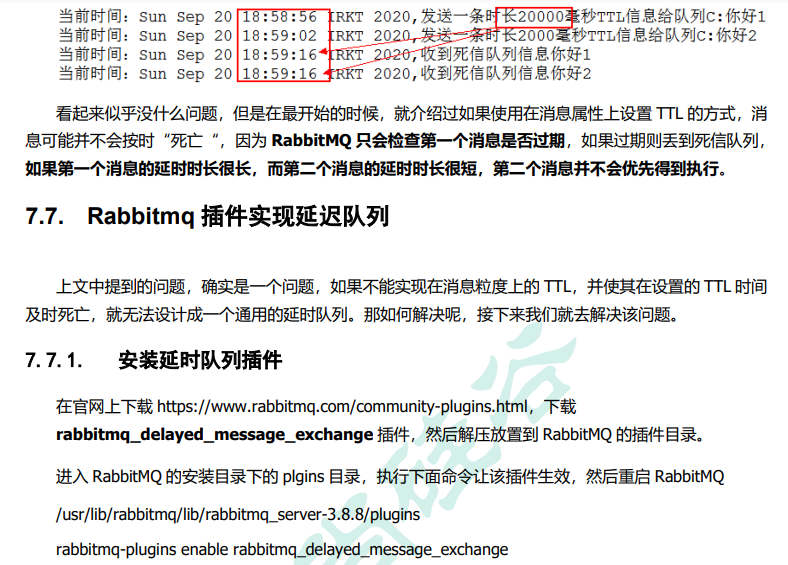
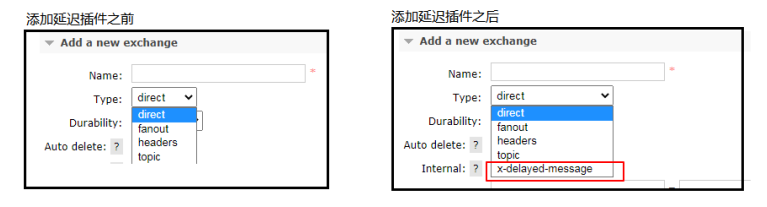
注意这里多出来的类型:x-delayed-message
先发送延时20000(20秒)的请求,再发送延时2000(2秒)的请求。
按理来说应该是2000(2秒)的先被消费,20000(20秒)的后被消费。
第一个,58分56秒到59分16秒刚好20秒,但是为啥第二个为02秒到16秒是12秒呢,因为延时队列有顺序。多个请求的情况下,你只能第一个先消费了,第二个才能消费,不管你需要延时多少秒。还记得在消息上设置ttl的隐藏缺陷吗?

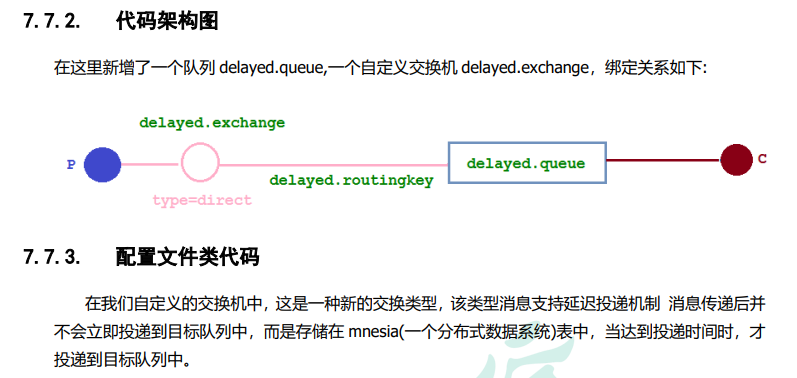
@Configuration
public class DelayedQueueConfig {
public static final String DELAYED_QUEUE_NAME = "delayed.queue";
public static final String DELAYED_EXCHANGE_NAME = "delayed.exchange";
public static final String DELAYED_ROUTING_KEY = "delayed.routingkey";
@Bean
public Queue delayedQueue() {
return new Queue(DELAYED_QUEUE_NAME);
}
//自定义交换机 我们在这里定义的是一个延迟交换机【CustomExchange】
@Bean
public CustomExchange delayedExchange() {
Map<String, Object> args = new HashMap<>();
//自定义交换机的类型
args.put("x-delayed-type", "direct");
// 交换机名字、交换机类型(安装插件后出现的)、是否持久化、是否自动删除、参数
return new CustomExchange(DELAYED_EXCHANGE_NAME, "x-delayed-message", true, false, args);
}
@Bean
public Binding bindingDelayedQueue(@Qualifier("delayedQueue") Queue queue, @Qualifier("delayedExchange") CustomExc delayedExchange) {
return BindingBuilder.bind(queue).to(delayedExchange).with(DELAYED_ROUTING_KEY).noargs();
}
}

延时队列在需要延时处理的场景下非常有用,使用 RabbitMQ 来实现延时队列可以很好的利用 RabbitMQ 的特性,如:消息可靠发送、消息可靠投递、死信队列来保障消息至少被消费一次以及未被正确处理的消息不会被丢弃。另外,通过 RabbitMQ 集群的特性,可以很好的解决单点故障问题,不会因为单个节点挂掉导致延时队列不可用或者消息丢失。
当然,延时队列还有很多其它选择,比如利用 Java 的 DelayQueue,利用 Redis 的 zset,利用 Quartz 或者利用 kafka 的时间轮,这些方式各有特点,看需要适用的场景。
发布确认高级
不要把消息应答和发布确认搞混了,
消息应答(手动)是,你的消息已经被消费了或拒绝了,一个明确的答复(回调)。
发布确认(异步确认)是,消息我发送到队列里了,消费与否是另外一回事,用的是监听。
发布确认的高级也是通过回调。
发到队列里面需要交换机,但是交换机出问题了咋整啊?这就是高级要解决的
生产者知道消息已经正确到达目的队列了,broker就会发送一个确认给生产者(包含消息的唯一 ID);如果消息和队列是可持久化的,那么确认消息会在将消息写入磁盘之后发出
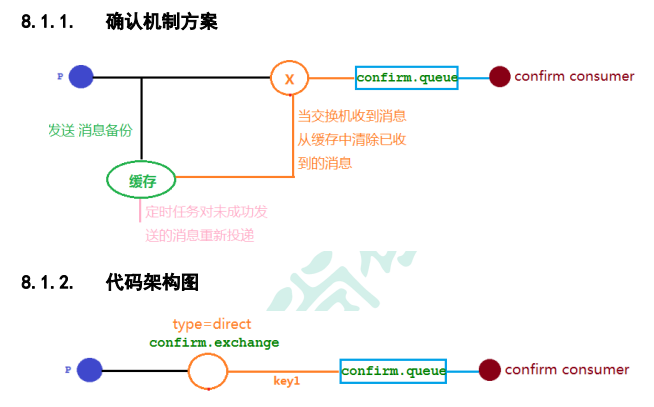
关键代码
@Component
@Slf4j
public class MyCallBack implements RabbitTemplate.ConfirmCallback {
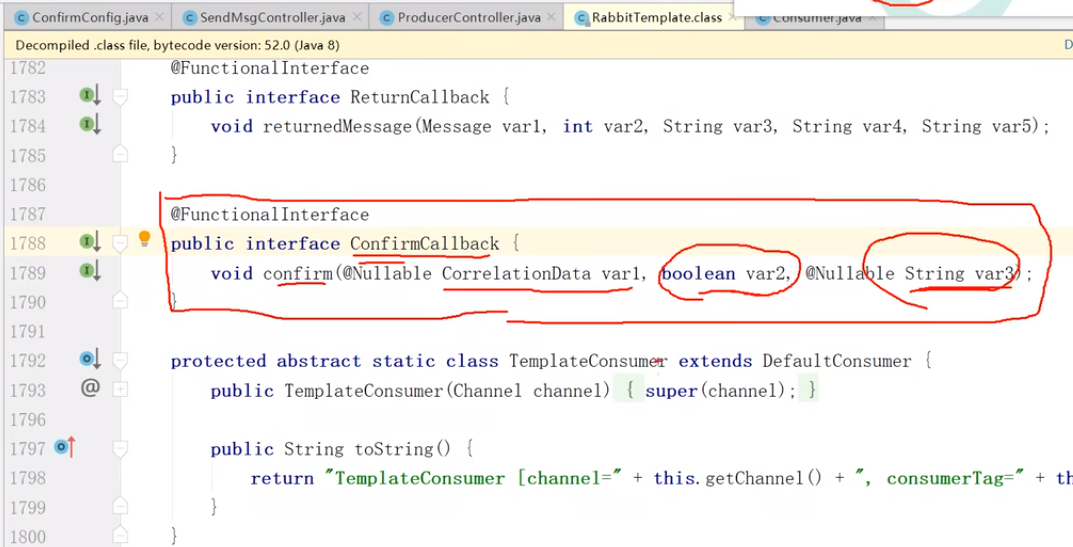
// 我们实现的是 RabbitTemplate 内部的一个接口 ConfirmCallback,但是我们的实现类MyCallBack 不在 RabbitTemplate 里面,导致 RabbitTemplate 将来调用不到 ConfirmCallback 这个自身接口,需要把我们的 MyCallBack 注入到 RabbitTemplate 的 ConfirmCallback 接口里
@Autowired
RabbitTemplate rabbitTemplate;
@PostConstruct // 这个注解是在@Component、@Autowired之后执行
public void init(){
rabbitTemplate.setConfirmCallback(this); // this,就是当前类喽
}
//当前类,注入到这个类的这个接口上,才能使用这个接口,这个实现类
//
/**
* 交换机不管是否收到消息的一个回调方法
* CorrelationData,发消息我们提供的
* 消息相关数据
* ack
* 交换机是否收到消息
*/
@Override
public void confirm(CorrelationData correlationData, boolean ack, String cause) {
String id=correlationData!=null?correlationData.getId():"";
if(ack){
log.info("交换机已经收到 id 为:{}的消息",id);
}else{
log.info("交换机还未收到 id 为:{}消息,由于原因:{}",id,cause);
}
}
}

生产者,应该能知道,交换机出了问题,我的消息,没有发出去。
下图模拟交换机正常,交换机都能正确应答,但是在队列不正常的时候,并且队列失败的信息无法给到生产者
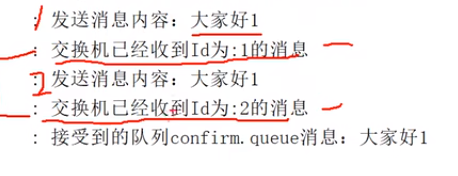
在仅开启了生产者确认机制的情况下,交换机接收到消息后,会直接给消息生产者发送确认消息,如果发现该消息不可路由(队列出了问题),那么消息会被直接丢弃,此时生产者是不知道消息被丢弃这个事件的。
@Component
@Slf4j
public class MyCallBack implements RabbitTemplate.ConfirmCallback,RabbitTemplate.ReturnCallback {
// 我们实现的是 RabbitTemplate 内部的一个接口 ConfirmCallback,但是我们的实现类MyCallBack 不在 RabbitTemplate 里面,导致 RabbitTemplate 将来调用不到 ConfirmCallback 这个自身接口,需要把我们的 MyCallBack 注入到 RabbitTemplate 的 ConfirmCallback 接口里
@Autowired
RabbitTemplate rabbitTemplate;
@PostConstruct // 这个注解是在@Component、@Autowired之后执行
public void init(){
rabbitTemplate.setConfirmCallback(this); // this,就是当前类喽,交换机
rabbitTemplate.setReturnCallback (this); // this,就是当前类喽,队列
}
//当前类,注入到这个类的这个接口上,才能使用这个接口,这个实现类
/**
* 交换机不管是否收到消息的一个回调方法
* CorrelationData
* 消息相关数据
* ack
* 交换机是否收到消息
*/
@Override
public void confirm(CorrelationData correlationData, boolean ack, String cause) {
String id=correlationData!=null?correlationData.getId():"";
if(ack){
log.info("交换机已经收到 id 为:{}的消息",id);
}else{
log.info("交换机还未收到 id 为:{}消息,由于原因:{}",id,cause);
}
}
//当消息无法路由的时候的回调方法(就是交换机路由到队列的那个时候)
@Override
public void returnedMessage(Message message, int replyCode, String replyText, String exchange, String routingKey) {
log.error(" 消 息 {}, 被交换机 {} 退回,退回原因 :{}, 路 由 key:{}",new String(message.getBody()),exchange,replyText,routingKey);
}
}

高级发布确认解决了消息丢失(交换机、队列)生产者无感知的问题,但是不够好。我们使用备份交换机更好地处理
备份交换机
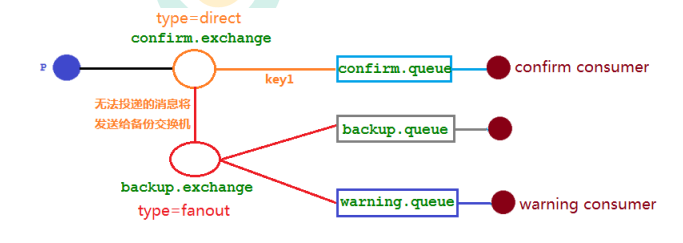
可以为队列设置死信交换机来存储那些 处理失败的消息,可是这些不可路由消息根本没有机会进入到队列,因此无法使用死信队列来保存消息。
@Configuration
public class ConfirmConfig {
public static final String CONFIRM_EXCHANGE_NAME = "confirm.exchange";
public static final String CONFIRM_QUEUE_NAME = "confirm.queue";
public static final String BACKUP_EXCHANGE_NAME = "backup.exchange";
public static final String BACKUP_QUEUE_NAME = "backup.queue";
public static final String WARNING_QUEUE_NAME = "warning.queue";
// 声明确认队列
@Bean("confirmQueue")
public Queue confirmQueue(){
return QueueBuilder.durable(CONFIRM_QUEUE_NAME).build();
}
//声明确认队列绑定关系
@Bean
public Binding queueBinding(@Qualifier("confirmQueue") Queue queue,
@Qualifier("confirmExchange") DirectExchange exchange){
return BindingBuilder.bind(queue).to(exchange).with("key1");
}
//声明备份 Exchange
@Bean("backupExchange")
public FanoutExchange backupExchange(){
return new FanoutExchange(BACKUP_EXCHANGE_NAME);
}
    	//声明确认 Exchange 交换机的备份交换机
    	@Bean("confirmExchange")
    	public DirectExchange confirmExchange(){
    	ExchangeBuilder exchangeBuilder = ExchangeBuilder.directExchange(CONFIRM_EXCHANGE_NAME).durable(true)
    	//设置该交换机的备份交换机
    	.withArgument("alternate-exchange", BACKUP_EXCHANGE_NAME);
    		return (DirectExchange)exchangeBuilder.build();
    	}
// 声明警告队列
@Bean("warningQueue")
public Queue warningQueue(){
return QueueBuilder.durable(WARNING_QUEUE_NAME).build();
}
// 声明报警队列绑定关系
@Bean
public Binding warningBinding(@Qualifier("warningQueue") Queue queue,
@Qualifier("backupExchange") FanoutExchange backupExchange){
return BindingBuilder.bind(queue).to(backupExchange);
}
// 声明备份队列
@Bean("backQueue")
public Queue backQueue(){
return QueueBuilder.durable(BACKUP_QUEUE_NAME).build();
}
// 声明备份队列绑定关系
@Bean
public Binding backupBinding(@Qualifier("backQueue") Queue queue, @Qualifier("backupExchange") FanoutExchange backupExchange){
return BindingBuilder.bind(queue).to(backupExchange);
}
}

主要是
//声明确认 Exchange 交换机的备份交换机
@Bean("confirmExchange")
public DirectExchange confirmExchange(){
ExchangeBuilder exchangeBuilder = ExchangeBuilder.directExchange(CONFIRM_EXCHANGE_NAME).durable(true)
//设置该交换机的备份交换机
.withArgument("alternate-exchange", BACKUP_EXCHANGE_NAME);
return (DirectExchange)exchangeBuilder.build();
}
需要把确认交换机和备份交换机进行产生关联。
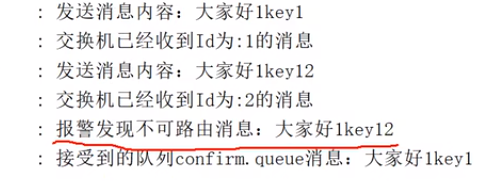
备份交换机,报警队列进行消费(处理)
注意:
mandatory 参数与备份交换机可以一起使用的时候,如果两者同时开启,消息究竟何去何从?谁优先级高,经过上面结果显示答案是备份交换机优先级高 。
RabbitMQ 其他知识点
幂等性、优先队列、惰性队列
幂等性:
用户对于同一操作发起的一次请求或者多次请求的结果是一致的,不会因为多次点击而产生了副作用。举个最简单的例子,那就是支付,用户购买商品后支付,支付扣款成功,但是返回结果的时候网络异常,此时钱已经扣了,用户再次点击按钮,此时会进行第二次扣款,返回结果成功,用户查询余额发现多扣钱了,流水记录也变成了两条。
Repeated consumption of messages:
When the consumer consumes the message in MQ, MQ has sent the message to the consumer. When the consumer returns ack to MQ, the network is interrupted, so MQ does not receive the confirmation information, and the message will be resent to other parties. consumer, or send it to the consumer again after the network is reconnected, but in fact the consumer has successfully consumed the message, causing the consumer to consume duplicate messages.
The solution to the idempotence of MQ consumers generally uses a global ID or writes a unique identifier such as a timestamp or UUID or the consumer of the order consumes the messages in MQ. You can also use the ID of MQ to judge, or you can follow your own rules. Generate a globally unique id. Each time a message is consumed, use this id to first determine whether the message has been consumed.
During the peak period of business when massive orders are generated, messages may be repeated on the production side. At this time, the consumer side must implement idempotence, which means that our messages will never be consumed multiple times, even if we receive Same news. There are two mainstream idempotent operations in the industry
: a. Unique ID + fingerprint code mechanism , using the database primary key to remove duplication. The advantage is that it is simple to implement, just one splice, and then query to determine whether it is duplicated; the disadvantage is that when concurrency is high, if it is a single database, there will be a writing performance bottleneck. Of course, you can also use sub-databases and sub-tables to improve performance, but it is not our most recommended option. Way.
b. Use the atomicity of redis to achieve it. Using redis to execute the setnx command is naturally idempotent . So as to achieve non-repeated consumption. (setnx: only join when the key does not exist, otherwise do not join)
Example of priority queue.
In the past, our back-end system used redis to store scheduled polling. Everyone knows that redis can only use List to make a simple message queue, and cannot implement a priority scenario. Therefore, when the order volume is large, RabbitMQ is used for transformation and optimization. If it is found that the order is from a large customer, it will be given a relatively high priority, otherwise it will be the default priority.
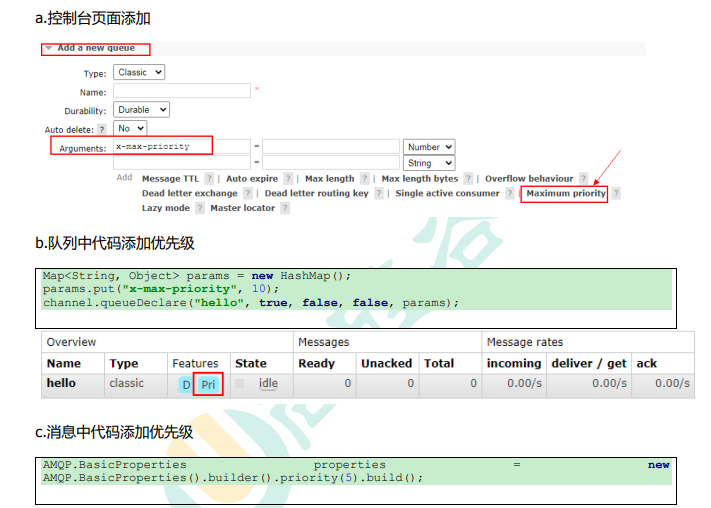
Of course, when working, I use code, not pages.
The following things need to be done to enable the queue to achieve priority: the queue needs to be set as a priority queue, the message needs to set the priority of the message, and the consumer needs to wait for [the message has been sent to the queue] before consuming it. Because, in this way, there is Opportunity to sort messages.
lazy queue
RabbitMQ introduced the concept of lazy queue starting from version 3.6.0. The lazy queue will store messages on disk as much as possible, and will only be loaded into memory when the consumer consumes the corresponding message. One of its important design goals is to be able to support longer queues, that is, to support more message storage. Lazy queues are necessary when consumers are unable to consume messages for a long time due to various reasons (such as consumers going offline, downtime, or shutting down due to maintenance, etc.).
By default, when a producer sends a message to RabbitMQ, the message in the queue will be stored in memory as much as possible, so that the message can be sent to the consumer faster. Even persistent messages retain a copy in memory while being written to disk. When RabbitMQ needs to release memory, it will page the messages in the memory to the disk. This operation will take a long time and will also block the queue operation, making it impossible to receive new messages. Although the developers of RabbitMQ have been upgrading related algorithms, the results are still not ideal, especially when the message volume is particularly large.
The queue has two modes: default and lazy. The default mode is default, and no changes are required for versions prior to 3.6.0. The lazy mode is the mode of the lazy queue. It can be set in the parameters when calling the channel.queueDeclare method, or it can be set through the Policy. If a queue is set using both methods at the same time, the Policy method has higher priority.
If you want to change the mode of an existing queue through declaration, you can only delete the queue first (the same is true for switches), and then re-declare a new one. When declaring the queue, you can set the mode of the queue through the "x-queue-mode" parameter. The values are "default" and "lazy". The following example demonstrates the declaration details of a lazy queue:
    Map<String, Object> args = new HashMap<String, Object>();
    args.put("x-queue-mode", "lazy");
    channel.queueDeclare("myqueue", false, false, false, args);
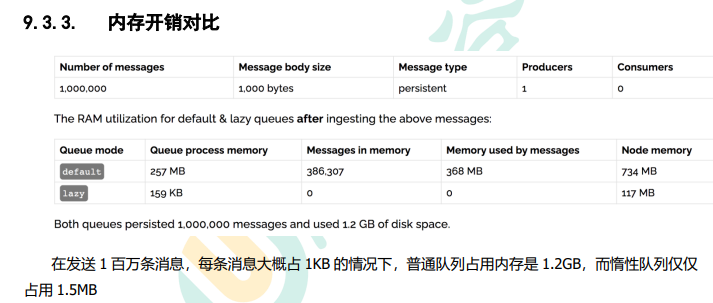
RabbitMQ cluster
At the beginning, we introduced how to install and run the RabbitMQ service, but these are stand-alone versions and cannot meet the requirements of current real applications. What should you do if the RabbitMQ server encounters memory corruption, machine power outage, or motherboard failure?
Mirror queue, the reason for using mirroring
If there is only one Broker node in the RabbitMQ cluster, the failure of this node will cause the overall service to be temporarily unavailable, and may also lead to the loss of messages. All messages can be set to persistence, and the durable attribute of the corresponding queue is also set to true, but this still cannot avoid problems caused by caching: because there is a gap between the time the message is sent and the time it is written to the disk and the flushing action is performed. A short but problematic window of time . The publisherconfirm mechanism ensures that the client knows which messages have been stored on disk. However, you generally do not want to encounter service unavailability due to a single point of failure.
Introducing the Mirror Queue mechanism, the queue can be mirrored to other Broker nodes in the cluster. If a node in the cluster fails, the queue can automatically switch to another node in the mirror to ensure service continuity. Availability.
Federation switch:
The mirror queue is clustered, this is between two independent servers